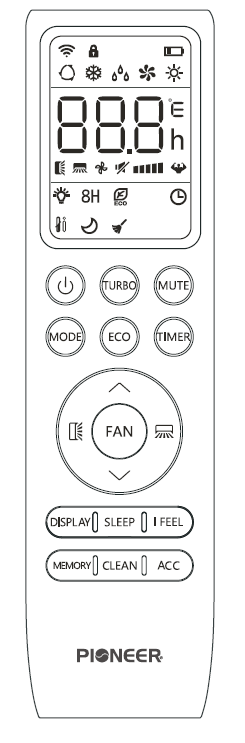
Understand the Buttons for the RC410TG Remote ControlUpdated 14 days ago
Introduction
This article explains the buttons available for the RC410TG remote controller.
The RC410TG remote controller is for the following systems:
- Diamante Essenza High-Wall (WYT-17)
- Diamante Essenza High-Wall (WYT-20U)
- Diamante Pro High-Wall (WYT-20S)
- Quantum Ultra High-Wall (WYT-24)
- Quantum Hyperformance High-Wall (WYT-25)
- Quantum Fresh High-Wall (WYT-FA)
- Quantum Ultra 8-Way Ceiling Cassette (CYT-24)
- Quantum Ultra Ducted Ceiling Concealed (RYT-24)
- Quantum Ultra Universal Floor-Ceiling Flex (UYT-24)
Note: The Quantum Fresh High-Wall series has a remote controller with slightly different functions. Click this link for information on the RC410TG-F remote controller.
Overview of the Buttons
Button | Description |
|---|---|
 | Turn the air conditioner on or off |
 | Activate or deactivate Turbo mode to allow the system to rapidly reach set temperatures |
 | Activate or deactivate the system's Mute mode |
 | Select the mode of operation |
 | Activate and deactivate the system's ECO mode |
Press and hold to activate the 46°F Freeze Protection setting | |
 | Configure the automatic on and off timer settings |
 | 1. Navigate the functional menu 2. Increase the set temperature and timing |
 | 1. Navigate the functional menu 2. Decrease the set temperature and timing |
 | Configure the fan speed (Auto, Low, Mid, or High) |
 | Activate or deactivate the up-down louver motor |
 | Activate or deactivate the left-right louver motor |
 | Turn the LED display on or off |
 | Activate or deactivate the system's Sleep mode |
 | Activate or deactivate the system's I Feel mode |
 | Activate or deactivate the Memory feature to recall saved temperature, mode, and fan settings |
 | Activate or deactivate the Self-Clean mode |
 | Reserved for future usage |
| Child-Lock | Press and hold the "MODE" and "TIMER" buttons to activate and deactivate the Child-Lock function |