Activate Sleep ModeUpdated 3 days ago
Introduction
This article explains how to put your system into Sleep mode.
Sleep mode is generally meant for periods of lesser cooling and heating requirements, such as during typical sleeping hours. This mode will decrease energy use.
After 10 hours in Sleep mode, the system will revert back to the previously set mode.
This article is for the following systems:
- Diamante Essenza High-Wall (WYT-17)
- Diamante Essenza High-Wall (WYT-20U)
- Diamante Pro High-Wall (WYT-20S)
- Quantum Ultra High-Wall (WYT-24)
- Quantum Hyperformance High-Wall (WYT-25)
- Quantum Fresh High-Wall (WYT-FA)
- Quantum Ultra 8-Way Ceiling Cassette (CYT-24)
- Quantum Ultra Ducted Ceiling Concealed (RYT-24)
- Quantum Ultra Universal Floor-Ceiling Flex (UYT-24)
Steps
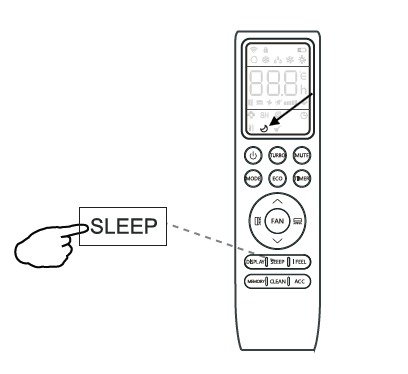
- Press the "SLEEP" button. The moon symbol will appear on the display.

- Press the "SLEEP" button again to exit from this mode.