
Integrate the Pioneer Airlink App with Amazon AlexaUpdated a month ago
Introduction
This article explains how to integrate the Pioneer Airlink app with Amazon Alexa.
Users can integrate their Pioneer Airlink app with third-party voice services to conveniently control the air conditioner, such as Amazon Alexa.
The Pioneer Airlink app can be linked with Amazon Alexa by using a verification code or the Pioneer Airlink account credentials. Both methods are explained below.
Prerequisites
- Download and install the Pioneer Airlink app. Click this link for more details.
- Create a Pioneer Airlink app account. For more information, see this link.
- Download and install the Amazon Alexa app.
- Configure the Amazon Echo device with the Amazon Alexa app.
Link with Verification Code
1. Open the Pioneer Airlink app.
2. Open the "Me" tab. 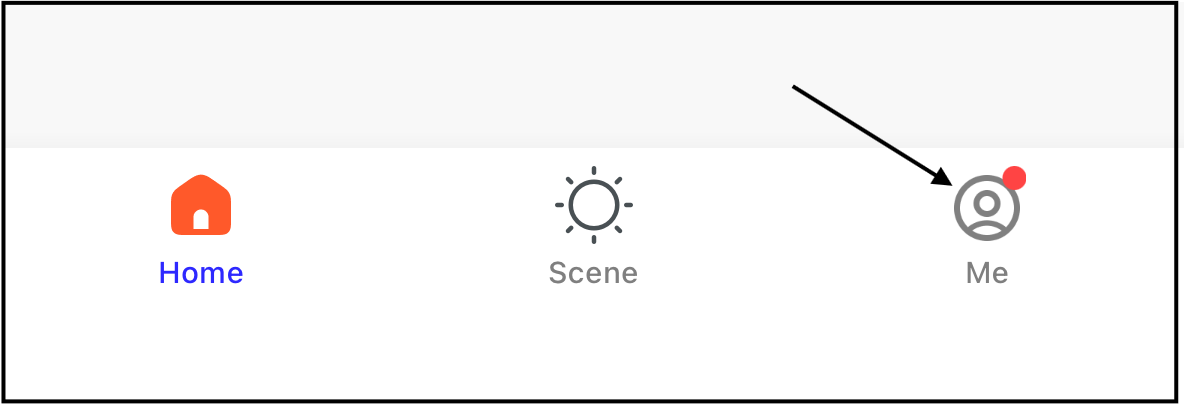
3. Tap "Alexa" under Third-Party Services. 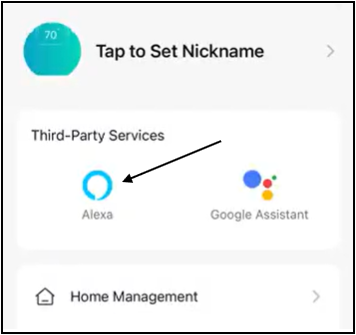
4. Tap "Link with verification code". The code will display. 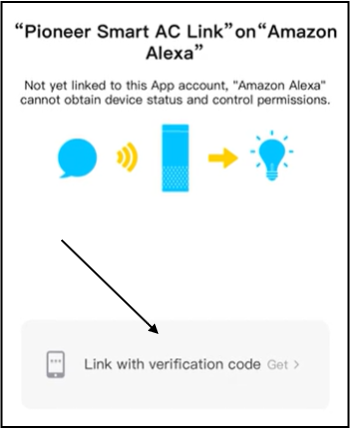
5. Open the Amazon Alexa app.
6. Search for "Pioneer Smart AC Link" in the Amazon Alexa app, then enter the login page and fill in the verification code. The verification code is only valid once. 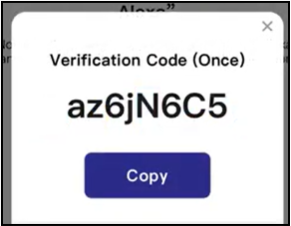
The Pioneer Airlink app is now linked with Amazon Alexa.
Link with Account Credentials
1. Open the Amazon Alexa app.
2. Search "Pioneer Smart AC Link" in the skills category of the Amazon Alexa app.
3. Enable the "Pioneer Smart AC Link" skill. Users will be navigated to the "Pioneer Smart AC Link" login page.
4. Follow the instructions on the page to complete the linking.
The Pioneer Airlink app is now linked with Amazon Alexa.