
Wrap the Lines & Mount the Indoor Unit for Wall-Mounted SystemsUpdated 24 days ago
Introduction
This article explains how to wrap the lines and mount the indoor unit for wall-mounted systems. This is the final step in the installation process for all wall-mounted indoor units.
This article is for the following systems:
- Diamante Essenza High-Wall (WYT-17)
- Diamante Pro High-Wall (WYT-20)
- Quantum Ultra High-Wall (WYT-24)
- Quantum Hyperformance High-Wall (WYT-25)
- Quantum Fresh High-Wall (WYT-FA)
Steps
- Arrange the pipes, cables, and drain hose correctly.
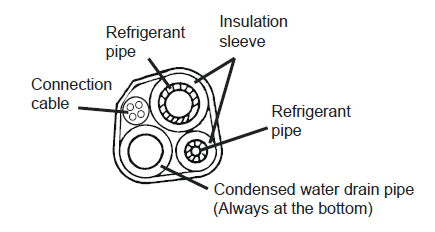
- Lag the pipe joints with insulation material and secure them with vinyl tape.

- Run the bound bundle through the wall hole and mount the indoor unit securely onto the mounting plate. Press/push the lower part of the indoor unit, so it clicks onto the mounting plate.
