
Connecting the Condensate Drain Hose for Wall-Mounted Indoor UnitsUpdated 6 days ago
Introduction
Learn how to connect the condensate drain hose for wall-mounted indoor units.
This article applies for the following systems:
- Diamante Essenza High-Wall (WYT-17)
- Diamante Pro High-Wall (WYT-20)
- Quantum Ultra High-Wall (WYT-24)
- Quantum Hyperformance High-Wall (WYT-25)
The condensate drain hose, also called a drain line, directs water away from the unit. Improper installation may cause property damage.
The indoor unit features two drain connections, located on the left and right sides. By default, the drain line attaches to the left side of the unit (when facing the back). One side connects to the hose, while the other remains plugged.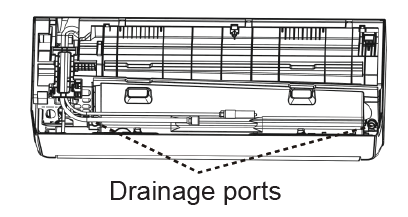
The drain hose for Quantum Fresh (WYT-FA) systems can only attached to the right-hand side of the unit. For information on connecting the drain hose for Quantum Fresh High-Wall systems, see this article.
Notes
Caution
- Ensure the drain line installation complies with all local and national codes and regulations.
- Verify that the drain line is insulated to prevent condensation and potential water damage. If it is not, insulate it properly.
- If the drain line is bent or installed incorrectly, water may leak and cause a water-level switch malfunction.
- Do not pull the drain line forcefully. This could disconnect it.
General Notes
- When using an extended drain line, tighten the indoor connection with an additional protection tube to prevent accidental disconnection.
- The drain line should slope downward at a gradient of at least 1/100 to prevent water from flowing back into the air conditioner.
- To prevent air bubbles, keep the drain line level or slightly tilted up by 3 inches (less than 75 mm).
- Installation requires a polyethylene tube (exterior diameter = 1 in / 25 mm), which can be obtained at a local hardware store or dealer.
A. Planning the Drain Line Layout
Before beginning the installation, plan the drain line layout and connection.
B. Cutting the Drain Line (If Needed)
If necessary, cut the drain line to fit your layout and connection.
C. Insulating the Drain Line (If Needed)
Verify that the drain line is insulated to prevent condensation and potential water damage. If it is not, insulate it properly. Insufficient insulation may allow dew to form due to low condensate temperatures, resulting in potential water damage.
Insulate the drain line before beginning the connection, excluding the joint sections. These will be insulated at the end of the procedure.
Ensure the insulation material is fitted tightly with no gaps. Do not over-tighten the insulation material. This may compress the air out of the material, causing poor insulation and early aging.
The insulation material must be made of flame-retardant material. Select a material that complies with local regulations.
The thickness of the insulation material must be more than 3/8 of an inch (10 mm).
Apply specialized adhesive to the insulation seams, then secure them with tape. Ensure the tape is at least 2 inches (51 mm) wide and applied firmly to prevent condensation.
D. Connecting the Drain Hose
1. Attach the drain line on the same side where the refrigerant piping exits the unit.
2. Attach any optional extensions (sold separately) to the end of the drain hose.
3. Wrap the drain line connection firmly with Teflon tape to ensure a tight seal and prevent leaks.
4. For the portion of the drain line that will remain indoors, wrap it with foam pipe insulation to prevent condensation.
E. Passing the Drain Line Through the Wall Hole
When passing the drain line through the wall hole, make sure the water drains to a safe location where it will not cause water damage or a slipping hazard.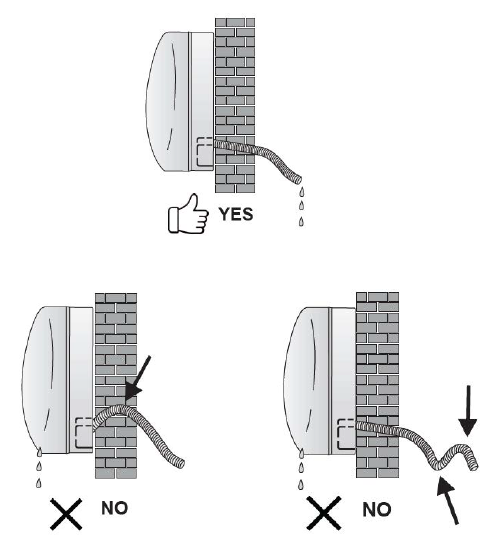
The drain line outlet should be at least 1-7/8 inches (50 mm) above the ground. If it touches the ground, the unit may become blocked, potentially leading to a malfunction.
If the water is discharged directly into the sewer, ensure the drain has a U or S pipe to prevent odors from coming back into the house.
F. Completing a Drainage Test
Ensure the condensate drains to a suitable location by completing the drainage test. Read this article for information on completing the drainage test for wall-mounted systems.
G. Insulating the Drain Line Joint Sections
The drain line joint insulation should be 2~4 inches (51~102 mm) longer than the gap to ensure a proper seal.
Insert the joint insulation into the gap of the existing insulation.
Ensure the joint insulation is securely fastened to the suction and liquid pipes to prevent gaps. Use adhesive to bond the joints together. Do not over-tighten the insulation material; this can compress the material and release the trapped air, causing poor insulation and premature aging.