Use the Remote Controller to Activate Heating Mode for Diamante Ultra Wall-Mounted SystemsUpdated 8 months ago
Introduction
Understand how to use the remote controller of Diamante Ultra Wall-Mounted (WYT-19) systems to activate Heating mode.
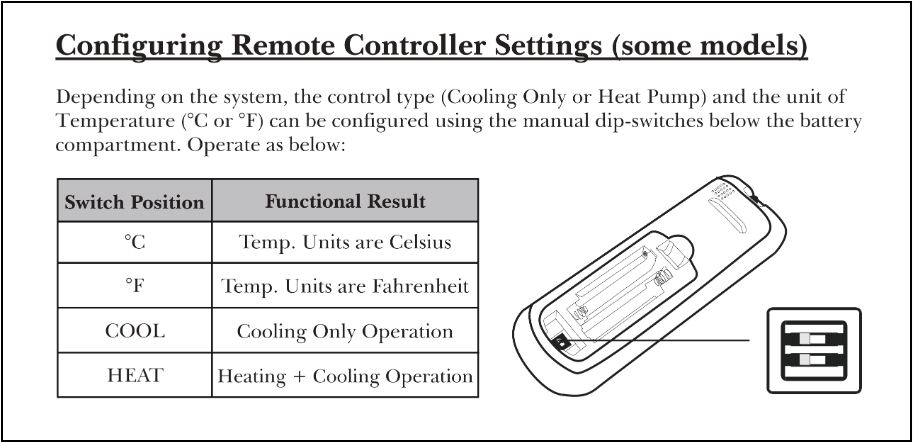
Most of the remote controllers in this series have manual dip-switches below the battery compartment to control the heat setting. Adjust the switch position to change the control type and unit of temperature.
Note: This article is for a product that is discontinued.
Steps
- Set the switch to the “Heat” position.
- Remove the batteries from the remote controller.
- Wait at least 30 seconds.
- Reinsert the batteries into the remote controller.
If the switch is already set to the “Heat” position and the system is not entering Heating mode, remove the batteries and reinsert them after 30 seconds. Then try to activate Heating mode again.
Use the diagram below to help you properly configure the remote controller settings: