
Understand the Front Panel Display for Wall-Mounted SystemsUpdated a month ago
Introduction
This article explains the front panel display layout for wall-mounted systems.
This article applies for the following systems:
- Diamante Essenza High-Wall (WYT-17)
- Diamante Essenza High-Wall (WYT-20U)
- Diamante Pro High-Wall (WYT-20S)
- Quantum Ultra High-Wall (WYT-24)
- Quantum Hyperformance High-Wall (WYT-25)
- Quantum Fresh High-Wall (WYT-FA)
Indoor Unit Display Layout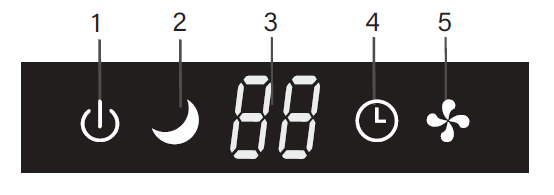
| No. | LED Icon | Symbol | Description |
|---|---|---|---|
| 1 | Power |  | Indicates that the unit is currently powered on |
| 2 | Sleep |  | Indicates that the system is currently in Sleep mode |
| 3 | Temperature Display |  | Displays the current set temperature or any error codes |
| 4 | Timer |  | Indicates that the Timer function has been set |
| 5 | Run |  | Indicates that the fan is currently on and running |

| No. | LED Icon | Symbol | Description |
|---|---|---|---|
| 1 | Temperature Display |  | Displays the current set temperature or any error codes |
| 2 | Timer |  | Indicates that the Timer function has been set |
| 3 | Sleep |  | Indicates that the system is currently in Sleep mode |
Notes:
- The shape and positions of the switches and indicators may vary according to the model, however the functions remain the same. There may be variances between the amount of digits that are shown on the remote controller versus the amount on the indoor unit.
- Do not obstruct the front panel, otherwise it may not be able to receive infrared commands from the remote controller. Ensure that the panel is not covered with paint or an adhesive layer. Keep all signal-emitting devices away.