
Subcooling Charging & Refrigerant Adjustment in Cooling ModeUpdated 8 months ago
Introduction
This article explains the process for subcooling charging and refrigerant adjustment in Cooling mode.
Subcooling is the only recommended charging method when the outdoor ambient temperature is between 68-113°F (20-45°C) and the indoor ambient temperature is between 68-89°F (20-32°C).
If either temperature is out of the range, use the weigh-in method. For information, see this article.
When the outdoor ambient temperature is higher than 68°F (20°C), make sure to return in spring or summer in order to accurately charge the system in Cooling mode.
Steps
1. Begin by checking the ambient temperature.
2. Activate Forced Cooling mode by starting the system in Cooling mode, then pressing and holding the "SET" button until the "dC" symbol displays. After entering Forced Cooling mode, the "dC" symbol and current compressor frequency will show alternatively on the digital display.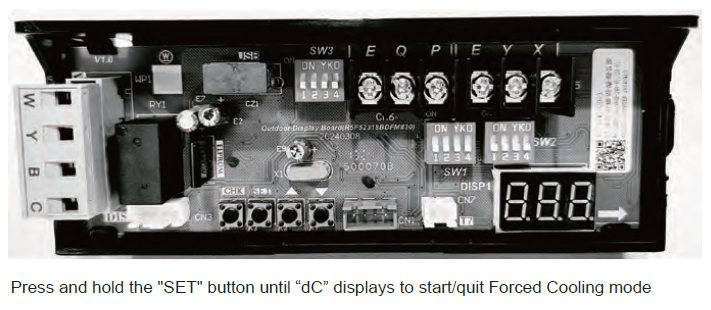
The Forced Cooling mode will automatically stop after 1 hour. The mode can be exited by pressing and holding the "SET" button again.
3. After Forced Cooling mode has started, wait 20 minutes for the system to stabilize. The compressor will maintain a specific frequency in this mode.
4. Determine the optimum subcooling value, which is based on the measured liquid line temperature and pressure below in the following table:
| Liquid Line Temp. (°F/°C) | Subcooling Value (°F/°C) | |||||||
| 6 | 7 | 8 | 9 | 10 | 11 | 12 | 13 | |
| Liquid Gauge Pressure (PSI) | ||||||||
| 55°F / 13°C | 164 | 167 | 170 | 172 | 175 | 178 | 181 | 184 |
| 60°F / 15.5°C | 178 | 181 | 184 | 187 | 191 | 194 | 197 | 200 |
| 65°F / 18°C | 194 | 197 | 200 | 203 | 206 | 210 | 213 | 217 |
| 70°F / 21°C | 210 | 213 | 217 | 220 | 223 | 227 | 230 | 234 |
| 75°F / 24°C | 227 | 230 | 234 | 238 | 241 | 245 | 249 | 252 |
| 80°F / 27°C | 245 | 249 | 252 | 256 | 260 | 264 | 268 | 272 |
| 85°F / 29°C | 264 | 268 | 272 | 276 | 280 | 284 | 288 | 292 |
| 90°F / 32°C | 284 | 288 | 292 | 297 | 301 | 305 | 309 | 314 |
| 95°F / 35°C | 305 | 309 | 314 | 318 | 323 | 327 | 332 | 336 |
| 100°F / 38°C | 327 | 332 | 336 | 341 | 346 | 351 | 355 | 360 |
| 105°F / 40.5°C | 351 | 355 | 360 | 365 | 370 | 375 | 380 | 385 |
| 110°F / 43°C | 375 | 380 | 385 | 390 | 396 | 401 | 406 | 412 |
| 115°F / 46°C | 401 | 406 | 412 | 417 | 422 | 428 | 433 | 439 |
| 120°F / 49°C | 428 | 433 | 439 | 445 | 450 | 456 | 462 | 468 |
| 125°F / 52°C | 456 | 462 | 468 | 474 | 480 | 486 | 492 | 498 |
5. If the calculated subcooling value is lower than the recommended design subcooling value in the following table, add refrigerant. If the calculated subcooling value is higher than the value shown in the table, recover refrigerant.
| Subcooling (°F/°C) | Ambient Temperature (°F/°C) | |||||
| 68~77 / 20~25 | 77~86 / 25~30 | 86~95 / 30~35 | 95~104 / 35~40 | 104~113 / 40~45 | ||
| Model | 24K | 10±2 | 8±2 | 8±2 | 6±2 | 6±2 |
| 36K | 10±2 | 8±2 | 8±2 | 6±2 | 6±2 | |
| 48K | 8±2 | 8±2 | 8±2 | 6±2 | 6±2 | |
| 60K | 8±2 | 8±2 | 8±2 | 6±2 | 6±2 | |
6. Wait 5 minutes for the system to stabilize and repeat the steps above until the subcooling value matches the design subcooling value in the table above.
7. Remove the service tools.
8. Press and hold the "SET" button to exit Forced Cooling mode. The "dC" symbol will disappear when exiting the Forced Cooling mode.