
Control the Airflow for Ducted Ceiling Concealed SystemsUpdated a day ago
Introduction
This article explains how to control the airflow for ducted ceiling concealed systems.
This article is for the following system:
The air that is pulled in by the fan (the return air) enters the grille and passes through the anti-dust filter. Then, the air is cooled, dehumidified, or heated through the heat exchanger.
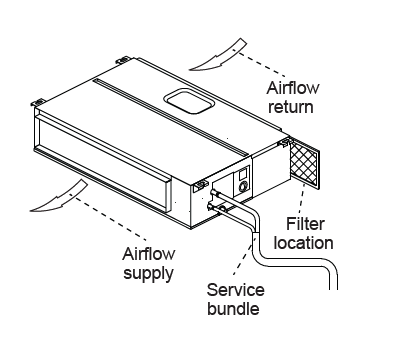
The air handler is typically ducted to the room(s) intended to be air conditioned. It is critical that all utilized ductwork is properly sized and calculated according to the demands of the zones and size of the system chosen. Improperly configured ducting will severely diminish system performance.
Do not manipulate the louvers manually or serious damage may occur. Never poke fingers, sticks, or other objects into the air inlet and outlet vents.
Steps
- Press the FAN button on the handheld remote control to cycle the fan speed of the air handler. The sequence is Mute → Low → Medium-Low → Medium → Medium-High → High → Turbo → Auto Speed.
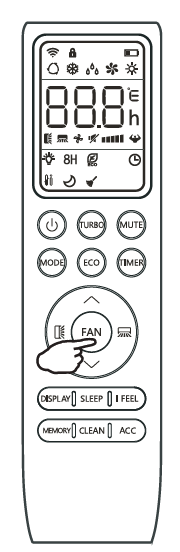
- If using the wired controller, press the FAN button to cycle through the sequence as outlined above. The current fan speed will display on the screen. In some cases, the wired controller cannot accept commands from the handheld remote control.
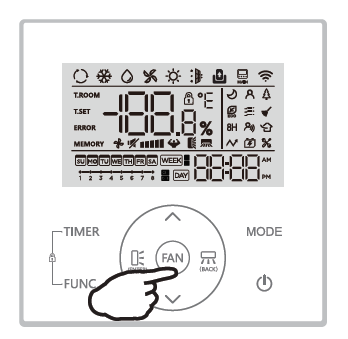
- If using the wired controller, press the FAN button to cycle through the sequence as outlined above. The current fan speed will display on the screen. In some cases, the wired controller cannot accept commands from the handheld remote control.
- Use the I feel setting to base system performance on the room temperature that is detected from the remote control. Click this link for more information about the I feel setting.
- By default, the return air temperature is detected at the indoor unit return air side.
- If the return air ducting is not set up well, it can lead to overcooling or overheating of the room.