
Understand the Wall Controller Display for RV Under-Bench SystemsUpdated 8 months ago
This article explains the wall controller display for Under-Bench RV Inverter Packaged Heat Pump Air Conditioners.
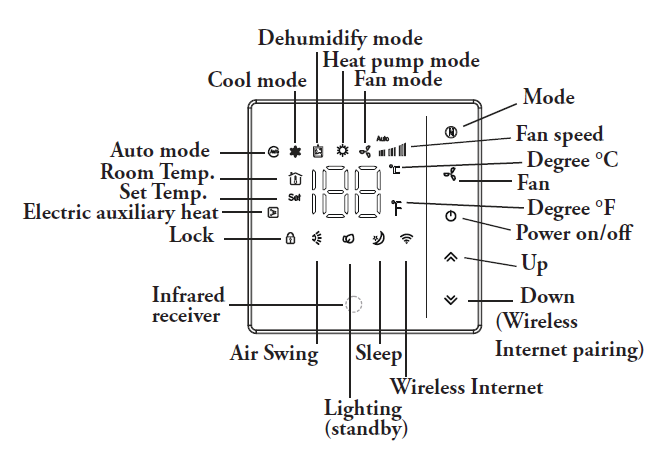
- Mode Button: Use this button to change the operating mode of the system.
- Fan Button: Use this button to select the desired fan speed (auto/high/med/low)
- On/Off Button: Use this button to switch the system on or off. It will start using the memory of the previous setting.
- Up/Down Buttons: Use these two buttons to configure the desired temperature.
- Functional LED Display: This will tell you the current set point temperature setting. After 10 seconds, the display will begin to show the current room temperature. After 1 minute, the display will turn off.
- Child Lock Button (Up/Down): Press and hold the up/down keys to open the child lock state. The system will then block any input.
- Wireless Internet Connection: Press and hold the Down key with the system off to enter pairing mode.