
Understand the Display Panel for Rooftop RV SystemsUpdated 8 months ago
This article explains the display panel for Full Inverter Rooftop RV Air Conditioner Heat Pumps.
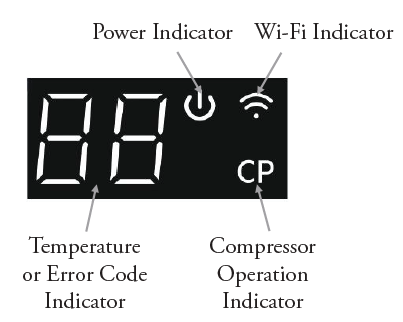
- Temperature and Error Code Display: Shows the set temperature, room temperature, and any error codes.
- Power Light: The power light will illuminate when the machine is activated and turn off when the machine is shut down.
- Compressor Operation Indicator Light: This light turns on when the compressor is running and turns off when the compressor stops.
- Wi-Fi Indicator Light: Indicates the status of the Wi-Fi connection. The light will flash when the system is ready to connect with a mobile app. The light will remain on continuously once the app is successfully connected.
Display Panel Buttons
- Wi-Fi Button: Used to enable or disable the Wi-Fi connection.
- Urgency On/Off Button: Provides a way to urgently start or shut down the machine when the remote controller is unavailable.