
Understand the LED Screen & Icons for the Remote Controller of RV SystemsUpdated a month ago
This article explains the LED screen and icons for the remote controller of recreational vehicles systems. This includes rooftop RV and under-bench RV systems.
After 2 seconds have elapsed, the system will confirm the selection with an audible beep from the machine's speaker.
Point the remote controller toward the control panel when sending commands to ensure the best reception.
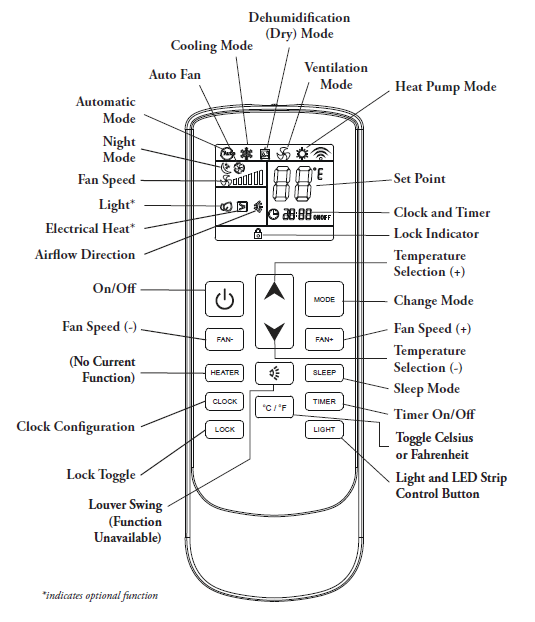
Notes for LED Strip Control Button:
- In Cooling or Heating mode, the operation of the LED strip can be controlled using the Sleep button.
- The LED strip will cycle continuously through the following sequence: off > on > white > blue > yellow > off
- The LED strip cannot be controlled while in Dry mode.