
Understand the Onboard Controller & Terminal Block Layout for QHD070 Whole-House Ducted DehumidifiersUpdated 8 months ago
This article explains the onboard controller and terminal block layout for QHD070 Whole-House Ducted Dehumidifiers. In addition, this article explains how to connect an external controller for the dehumidifier.
Onboard Controller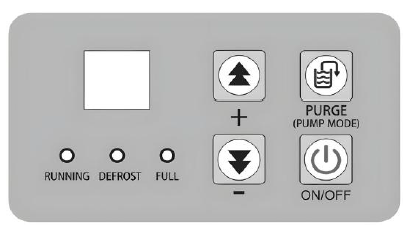
- Power Key: Press this key to turn the system on or off.
- Purge Key: For one-touch drainage, press this key to start water pump drainage.
- Plus Key: Press this key to increase the value of the selected parameter.
- Minus Key: Press this key to decrease the value of the selected parameter.
Terminal Block Layout
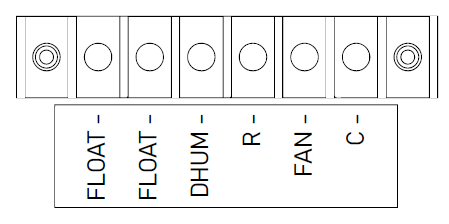
- FLOAT: External low pressure water level sensor or float switch.
- DHUM: Compressor and fan during dehumidification operation.
- R: 12VDC output. External 12VDC devices can be powered by this terminal.
- FAN: Running fan in Ventilation mode.
- C: 12VDC output. External 12VDC devices can be powered by this terminal.
Connect an External Controller
Connect an external controller via the terminal model RJ12, 6P6C protocol, or Modbus serial communication. The external controller can complete the following functions:
- Turn the product on or off.
- Send control and query commands.
- Set humidity values or fan speeds.
- Enable or disable continuous dehumidification operation.
- Query the temperature or humidity.
- Display any error codes.