
Integrate the Pioneer Airlink App with Google HomeUpdated a month ago
Introduction
This article explains how to integrate the Pioneer Airlink app with Google Home.
Users can integrate their Pioneer Airlink app with third-party voice services to conveniently control the air conditioner. Google Home uses Google Assistant as a voice-activated virtual assistant.
The Pioneer Airlink app can be linked with Google Home by using a verification code or the Pioneer Airlink account credentials. Both methods are explained below.
Prerequisites
- Download and install the Pioneer Airlink app. Click this link for more details.
- Create a Pioneer Airlink app account. For more information, see this link.
- Download and install the Google Home app.
- Configure the Google Home device with the Google Home app.
Link with Verification Code
1. Open the Pioneer Airlink app.
2. Open the "Me" tab. 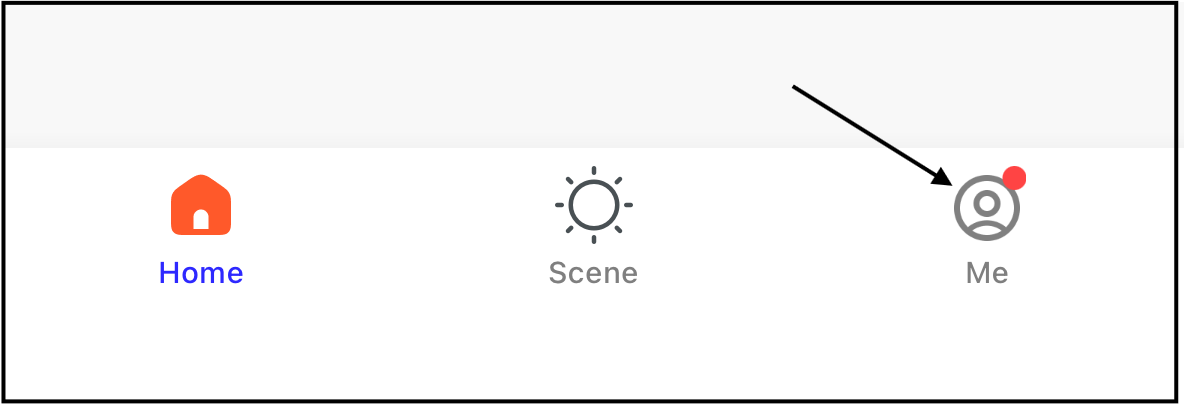
3. Tap "Google Assistant" under Third-Party Services. 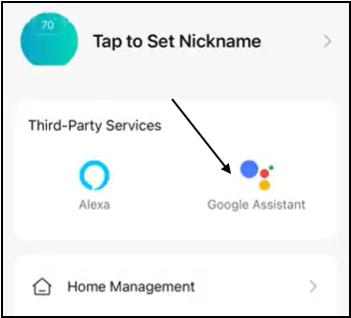
4. Tap "Link with verification code". The code will display. 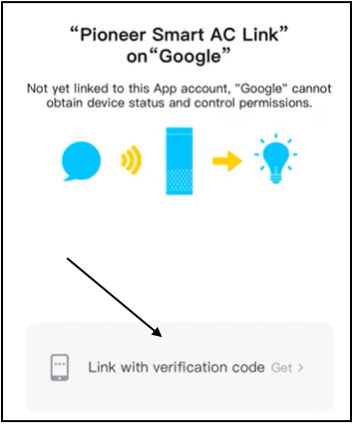
5. Open the Google Home app.
6. Search for "Pioneer Smart AC Link" in the Google Home app, then enter the login page and fill in the verification code. The verification code is only valid once. 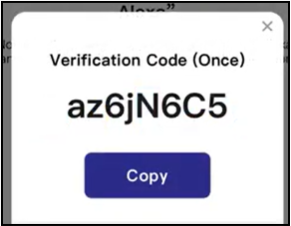
The Pioneer Airlink app is now linked with Google Home.
Link with Account Credentials
1. On the main page of the Google Home app, tap the sidebar menu in the top left corner and select "Home Control".
2. Tap the plus sign in the lower right corner and search for "Pioneer Airlink".
3. Find Pioneer Airlink on the list and open it.
4. Select the country or region where the Pioneer Airlink app is located.
5. Enter the email address linked to the Pioneer Airlink account and the login password. Then, tap "Link Now".
The Pioneer Airlink app is now linked with Google Home.