
Understand the Display Layout for ECOasis 50 Energy Recovery VentilatorsUpdated 6 hours ago
Introduction
This article explains the display layout of the ECOasis 50 Ductless Wall-Mounted Single-Room Energy Recovery Ventilator.
Understanding the Control Buttons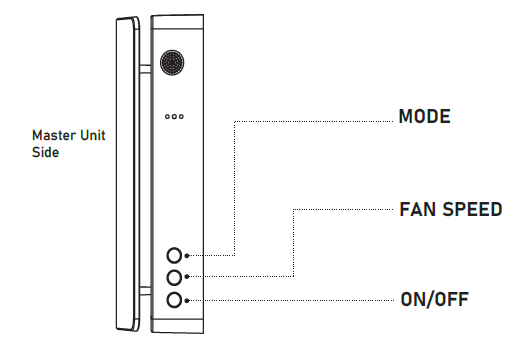
Mode: When the unit is on, you can switch between operating modes (supply, exhaust, and regeneration).
Fan Speed: When the unit is on, you can change the fan speed. There are three speeds.
On/Off: Turns the unit on or off.
Function Lights
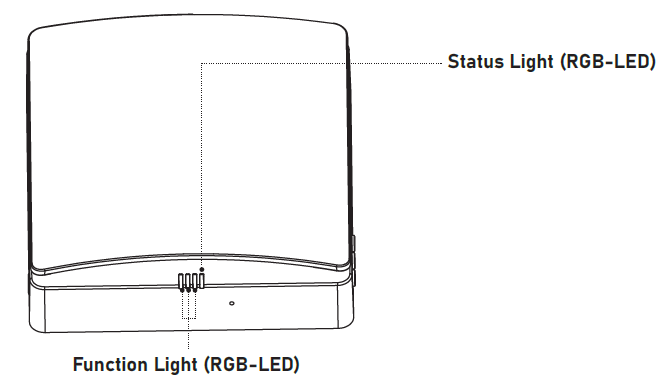
- The function light indicates the fan speed. There a three speeds in total.
- The green light indicates air supply.
- The red light indicates air exhaust.
- The blue light indicates regeneration mode, in which the ventilator alternates between air supply and air exhaust every 75 seconds.
Status Lights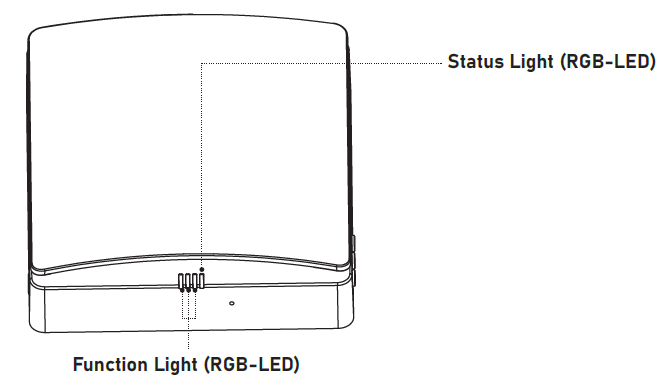
On Status
- Blue light is on: Pairing mode is active, and the primary and secondary units are linked.
- Green light is on: The IoT function is enabled, Wi-Fi is connected, and the device can be controlled from a smartphone app.
- Red light is on: Filter alarm. The filter in the inner duct needs to be cleaned or replaced.
- Purple light is on: The primary unit is in linked mode. The IoT function is enabled, and the unit can be controlled from a smartphone app.
- Green light flashes slowly: Automatic ventilation mode is active.
- Blue light flashes slowly: Free-cooling mode is active.
- Red light flashes three times: The filter reminder has been reset.
Off Status (Coordinated with the Buttons)
- Blue light flashes slowly: The unit is set as the primary unit.
- Green light flashes slowly: The unit is set as the secondary unit.
- Red light flashes slowly: Wi-Fi setup mode. The unit is ready to connect to Wi-Fi.