
Understand the Master Unit Display for ECOasis 50 Energy Recovery VentilatorsUpdated 8 months ago
Introduction
This article explains the display of the master unit for ECOasis 50 Ductless Wall-Mounted Single-Room Energy Recovery Ventilators.
Buttons on the Master Unit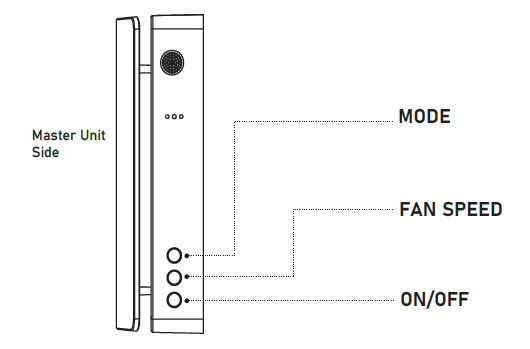
Mode: Use this button to switch the working mode of the device. The available working modes are Supply mode, Exhaust mode, and Regeneration mode.
Fan Speed: Use this button to switch the fan speed of the device. There are three speeds in total.
On/Off: Use this button to turn on and off the system.
Function Lights (RGB-LED)
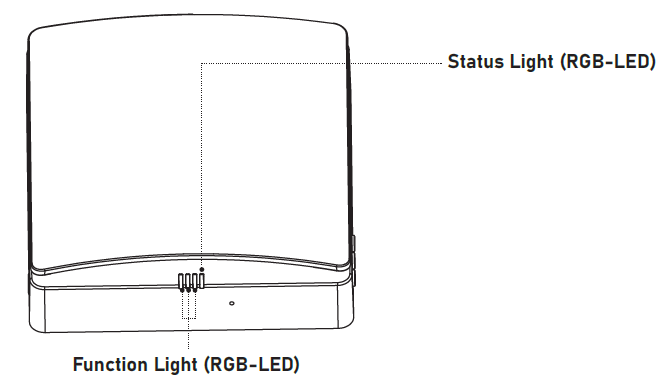
- The function light indicates the fan speed. There a three speeds in total.
- The green light indicates air supply.
- The red light indicates air exhaust.
- The blue light indicates regeneration mode, which switches on after 75 seconds of cyclic operation between the air supply and air exhaust.
Status Lights (RGB-LED)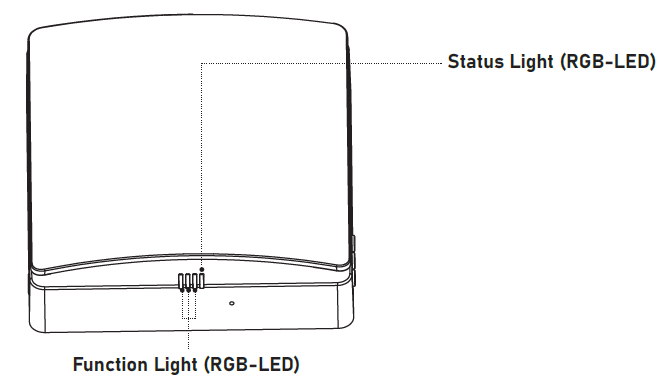
On Status
- Blue light is on: Indicates the pairing mode is activated, and the linkage communication function is active between the master and slave units.
- Green light is on: Indicates the IoT function is enabled, Wi-Fi is connected successfully, and the user is able to control the device from their phone.
- Red light is on: Indicates the filter cleaning alarm intended to remind users that it is time to clean or replace the filter within the inner duct.
- Purple light is on: Indicates the master role in master-slave online mode, the master IoT networking function is enabled, and the unit can be controlled by the user's phone.
- Green light flashes slowly: Indicates the Automatic Ventilation function is on and running.
- Blue light flashes slowly: Indicates the Free-Cooling function is on and running.
- Red light flashes three times: Indicates that the filter cleaning is complete and the cleaning time has been reset.
Off Status (Coordinated with the Buttons)
- Blue light flashes slowly: Indicates the device role is set as the master in pairing mode.
- Green light flashes slowly: Indicates the role of the device is set as the slave in pairing mode.
- Red light flashes slowly: Indicates that the device is in Wi-Fi Connection mode.