
Understand the Display Screen for ECOasis 150 Energy Recovery VentilatorUpdated 5 hours ago
Introduction
This article explains how to read and use the display screen on the ECOasis 150 Ductless Wall-Mounted Single-Room Energy Recovery Ventilators.
Display Screen Overview
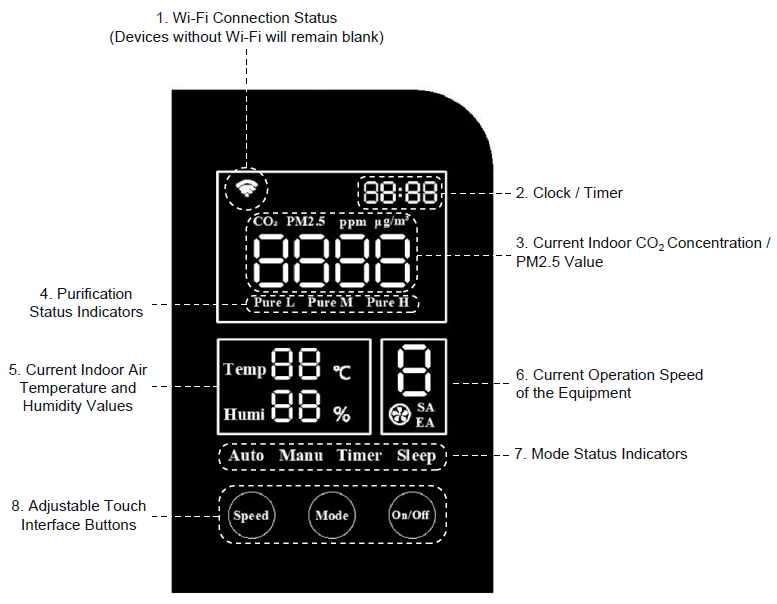
Display Screen Control Buttons
- Press the "On/Off" button to turn or off the device.
- When the equipment starts, it defaults to Auto mode. Press the “Mode” button to cycle through the modes in the following order: Auto > Manual > Timer > Sleep > Pure L > Pure M > Pure H.
- In Manual mode, press the “Speed” button to select a speed from 1 to 8.
Display Screen Control Button Combinations
| Combinations | Result |
| When the ventilator is on, press and hold the “On/Off” and “Speed” buttons together | 1. Reset Wi-Fi 2. Clear connection information |
| Whether the ventilator is on or off, press and hold the “On/Off” and “Mode” buttons together | Reset to Factory default setting |
| When the ventilator is off, press and hold the “On/Off” button | Set RS485 address |