
Understand the Remote Controllers for ECOasis Ducted Ceiling-Mounted Energy Recovery VentilatorsUpdated 3 hours ago
Introduction
This article explains the remote controllers for ECOasis Ducted Ceiling-Mounted Energy Recovery Ventilators. Two remote controller models are available: the HDK-CK23C2 and the HDK-CK23C1 (optional).
This article applies to the following systems:
- ECOasis Ducted 100 Ceiling-Mounted Energy Recovery Ventilator
- ECOasis Ducted 160 Ceiling-Mounted Energy Recovery Ventilator
- ECOasis Ducted 200 Ceiling-Mounted Energy Recovery Ventilator
- ECOasis Ducted 320 Ceiling-Mounted Energy Recovery Ventilator
Model HDK-CK23C2
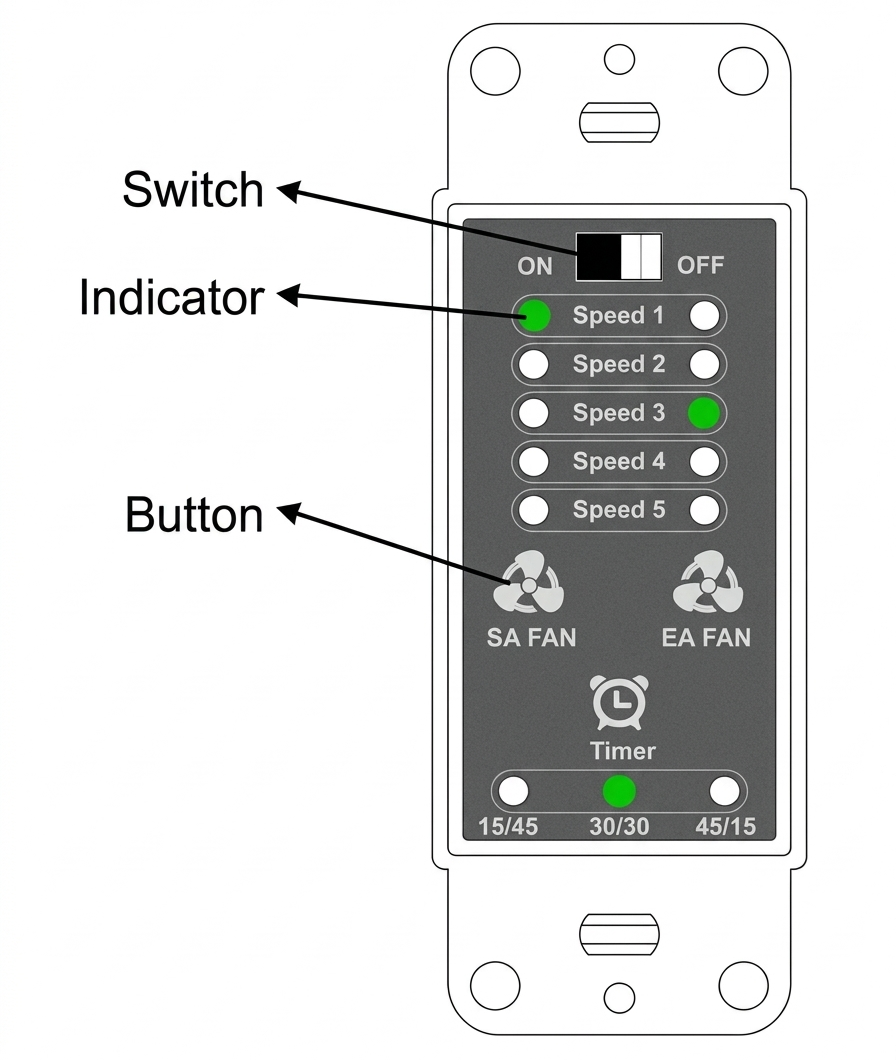
| No. | Function | Instructions |
| 1 | On/Off (Power) button | On - Turn on / Off - Turn off |
| 2 | SA Fan Control | Supply air fan: 5 speeds |
| 3 | EA Fan Control | Exhaust air fan: 5 speeds |
| 4 | SA Speed Indicator | Indicates the set speed |
| 5 | EA Speed Indicator | Indicates the set speed |
| 6 | Constant Operation | The unit operates continuously at the set speed |
| 7 | Intermittent Operation (15 mins) | The unit operates at the set speed for 15 mins, then stops for 45 mins and continues the cycle according to this process. |
| 8 | Intermittent Operation (30 mins) | The unit operates at the set speed for 30 mins, then stops for 30 mins and continues the cycle according to this process. |
| 9 | Intermittent Operation (45 mins) | The unit operates at the set speed for 45 mins, then stops for 15 mins and continues the cycle according to this process. |
| 10 | Controller Communication Failure | All the 13 indicators lamps flash |
| 11 | Failure Display 1 | SA fan failure, all the SA fan indicator lamps flash |
| 12 | Failure Display 2 | EA fan failure, all the EA fan indicator lamps flash |
Operating Instructions
- On/Off (Power): On - Turns on the unit; Off - Turns off the unit.
- Set Fan Speeds: Press SA FAN to set the supply air (SA) fan speed. Press EA FAN to set the exhaust air (EA) fan speed.
- Set Intermittent Operation (15 minutes): Press the Timer button. When the 15/45 indicator lights up, the unit will run at the set speed for 15 minutes, stop for 45 minutes, and then repeat this cycle.
- Set Intermittent Operation (30 minutes): Press the Timer button. When the 30/30 indicator lights up, the unit will run at the set speed for 30 minutes, stop for 30 minutes, and then repeat this cycle.
- Set Intermittent Operation (45 minutes): Press the Timer button. When the 45/15 indicator lights up, the unit will run at the set speed for 45 minutes, stop for 15 minutes, and then repeat this cycle.
- Constant Operation: When all timer indicators are off, the unit runs continuously at the set speed. Press the Timer button to set the indicator lamps.
Model HDK-CK23C1
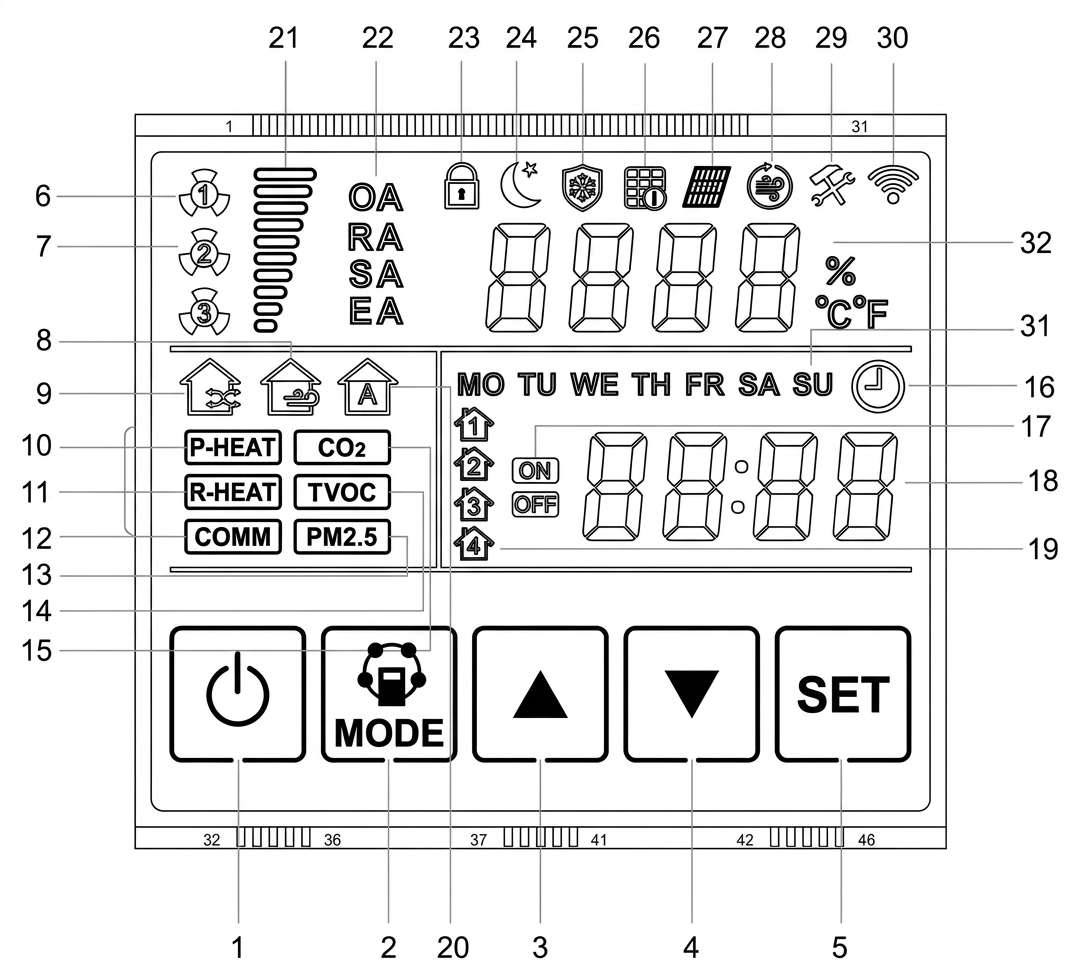
| No. | Name | No. | Name |
| 1 | On/Off (⏻) button | 17 | Timed Power on/off |
| 2 | MODE button | 18 | Time |
| 3 | Up (▲) button | 19 | Time Period |
| 4 | Down (▼) button | 20 | Automatic Mode |
| 5 | SET button | 21 | Fan Speed |
| 6 | Supply Air Fan on/off | 22 | Temperature Type |
| 7 | Exhaust Air Fan on/off | 23 | Lock |
| 8 | Bypass Mode on/off | 24 | Sleep Mode |
| 9 | Heat Exchanger Mode on/off | 25 | Defrost |
| 10 | Preheating | 26 | Filter Alarm |
| 11 | Heating | 27 | Heat Exchanger Alarm |
| 12 | Communication | 28 | High Speed |
| 13 | PM2.5 | 29 | Error |
| 14 | TOVC | 30 | Wi-Fi |
| 15 | CO₂ | 31 | Week |
| 16 | Clock | 32 | Temperature & Humidity |
Operating Instructions
- On/Off (⏻): Turns the unit on or off.
- When the unit is turned on, the display backlight turns on.
- If no button is pressed for 30 seconds, the backlight turns off.
- If the backlight is off while the unit is on, press any button to turn it back on.
- When the unit is turned off, the display turns off.
- When the unit is turned on again, it resumes the operating mode it was in before it was turned off.
- Time Setting Function: With the unit on, press and hold the SET button for 3 seconds from any screen to enter clock setting mode. When the hour flashes, press the up (▲) or down (▼) button to set the hour. Press SET again to move to the minute and day-of-week settings, and use the up (▲) or down (▼) button to set each one. Press MODE to exit, or wait 15 seconds for the system to exit automatically.
- Screen Lock Setting (Lock the Controller Screen): With the unit on, press and hold the ⏻ (On/Off) button for 5 seconds to lock the control. The lock icon appears on the display. While the controller is locked, the other buttons do not respond. To unlock, press and hold the ⏻ (On/Off) button for 5 seconds again. The lock icon disappears.