
Activate the Timer On/Timer Off FunctionUpdated a day ago
Introduction
This article explains how to activate the timer on and timer off functions.
The timer function gives users the ability to set a time delay for the system to turn itself on or off.
This article is for the following systems:
- Diamante Essenza High-Wall (WYT-17)
- Diamante Essenza High-Wall (WYT-20U)
- Diamante Pro High-Wall (WYT-20S)
- Quantum Ultra High-Wall (WYT-24)
- Quantum Hyperformance High-Wall (WYT-25)
- Quantum Fresh High-Wall (WYT-FA)
- Quantum Ultra 8-Way Ceiling Cassette (CYT-24)
- Quantum Ultra Ducted Ceiling Concealed (RYT-24)
- Quantum Ultra Universal Floor-Ceiling Flex (UYT-24)
Timer On
- Press the TIMER button on the remote control while the system is powered off. The clock icon will display flashing.
- Press the up (▲) or down (▼) button to the set needed time delay in 30 minute increments. The default setting is 6 hours.
- Press the TIMER button again to confirm the selection.
- Press the MODE button to select the desired operating mode that the unit will start up in.
- Press the FAN button to set the desired fan speed that the unit will start up in.
- Press the up (▲) or down (▼) button to set the desired operation temperature.
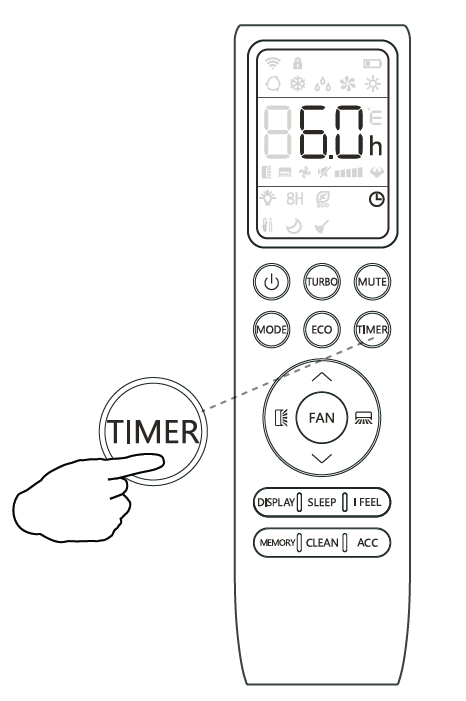
The unit is now primed.
Note: The programming will cancel if no buttons are pressed after 5 seconds. This may require restarting the process.
Timer Off
- Confirm that the unit is on and running.
- Press the TIMER button to enter the prompt for switching off the system.
- Press the up (▲) or down (▼) buttons to configure the time delay setting.
- Press the TIMER button again to confirm. Press the TIMER button again to cancel the setting.