Activate Heating ModeUpdated 4 days ago
Introduction
This article explains how to put your system into Heating mode.
Heating mode utilizes the heat pump to warm the air in the room by reversing the cooling cycle. The system may take up to 10 minutes before it begins delivering heat, allowing the coil to warm up and prevent cold airflow.
Fan speed is not available. Rather, the fan will blow out air at a specific speed that is in proportion to how much the heat exchanger has been warmed up to.
The unit will periodically enter a defrost cycle, which is essential in order to clean frosting off the condenser and recover heat exchange capabilities. This process is normal and lasts for 2-10 minutes. Press the "ECO" button 10 times in 8 seconds to trigger a forced defrost.
While in the defrost cycle, the indoor unit's fan will stop operating. After the cycle is completed, the system will resume its normal Heating mode operation automatically.
This article is for the following systems:
- Diamante Essenza High-Wall (WYT-17)
- Diamante Essenza High-Wall (WYT-20U)
- Diamante Pro High-Wall (WYT-20S)
- Quantum Ultra High-Wall (WYT-24)
- Quantum Hyperformance High-Wall (WYT-25)
- Quantum Fresh High-Wall (WYT-FA)
- Quantum Ultra 8-Way Ceiling Cassette (CYT-24)
- Quantum Ultra Ducted Ceiling Concealed (RYT-24)
- Quantum Ultra Universal Floor-Ceiling Flex (UYT-24)
Steps
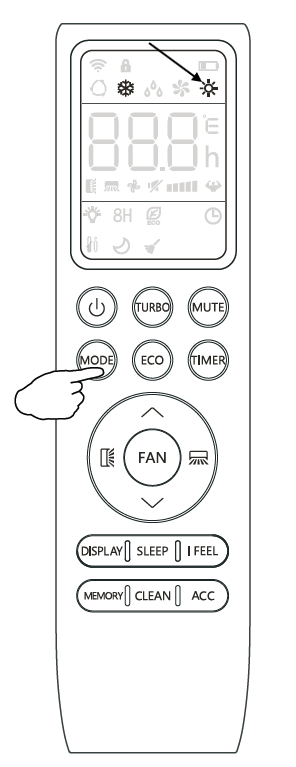
- Press the "MODE" button until the sun symbol appears on the remote controller's display.
- Use the up and down arrow buttons to set a temperature higher than that of the room.