Activate Fan-Only ModeUpdated 3 days ago
Introduction
This article explains how to put your system into Fan-Only mode.
Fan-Only mode sets the system to use only air ventilation and no heating or cooling.
This article is for the following systems:
- Diamante Essenza High-Wall (WYT-17)
- Diamante Essenza High-Wall (WYT-20U)
- Diamante Pro High-Wall (WYT-20S)
- Quantum Ultra High-Wall (WYT-24)
- Quantum Hyperformance High-Wall (WYT-25)
- Quantum Fresh High-Wall (WYT-FA)
- Quantum Ultra 8-Way Ceiling Cassette (CYT-24)
- Quantum Ultra Ducted Ceiling Concealed (RYT-24)
- Quantum Ultra Universal Floor-Ceiling Flex (UYT-24)
Steps
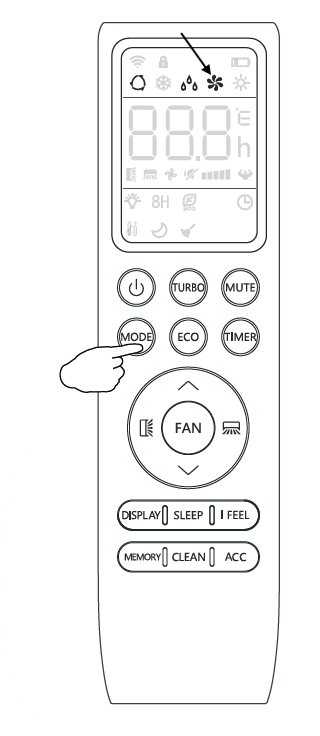
- Press the "MODE" button until the fan symbol appears on the remote controller's display.
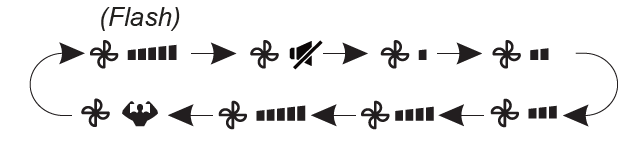
- Use the "FAN" button to set the desired fan speed. The system will cycle from Auto > Mute > Low > Low-Mid > Mid > Mid-High > High > Turbo.