Activate Auto ModeUpdated a day ago
Introduction
This article explains how to put your system into auto mode.
In auto mode, the system selects either cooling, heating, or fan-only mode based on the delta-T (△T), which is the difference between the room temperature and set temperature.
| △T (RT-ST) | △T > 2°F | -2°F ≤ △T ≤ 2°F | △T < 2°F |
| Mode | Cooling | Fan-Only | Heating |
This article is for the following systems:
- Diamante Essenza High-Wall (WYT-17)
- Diamante Essenza High-Wall (WYT-20U)
- Diamante Pro High-Wall (WYT-20S)
- Quantum Ultra High-Wall (WYT-24)
- Quantum Hyperformance High-Wall (WYT-25)
- Quantum Fresh High-Wall (WYT-FA)
- Quantum Ultra 8-Way Ceiling Cassette (CYT-24)
- Quantum Ultra Ducted Ceiling Concealed (RYT-24)
- Quantum Ultra Universal Floor-Ceiling Flex (UYT-24)
Steps
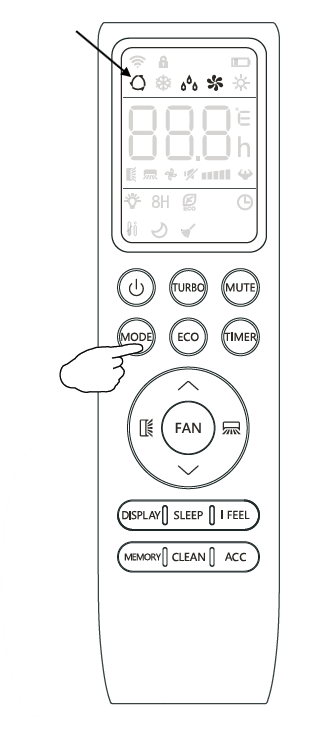
- To activate auto mode, press the MODE button on the remote control until the cycle symbol appears on the display.
- Press the up (▲) or down (▼) button to set the desired room temperature.