
Connect the Power/Signal Electrical Wiring for Wall-Mounted SystemsUpdated 2 days ago
Introduction
This article explains how to connect the power/signal electrical wiring to the outdoor unit for wall-mounted systems.
A comprehensive wiring diagram is printed on the inside of the wiring cover. 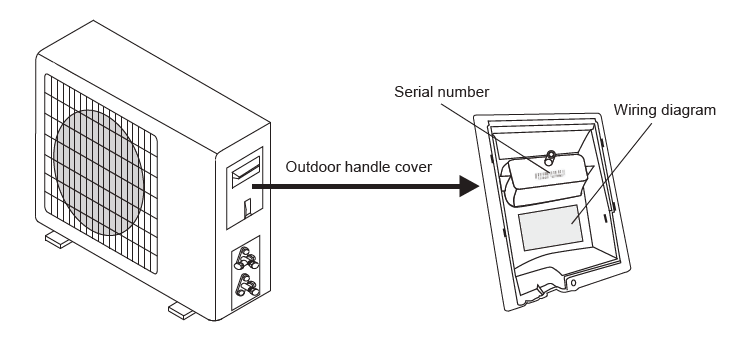
This article is for the following articles:
- Diamante Essenza (WYT-17)
- Diamante Pro (WYT-20)
- Quantum Ultra High-Wall (WYT-24)
- Quantum Hyperformance (WYT-25)
- Quantum Fresh (WYT-FA)
Connect the Signal Cable
The indoor and outdoor units each have three terminals (1, 2, 3) and ground wiring (G). Match the terminals number to number. Color selection does not matter as much as matching number to number does. 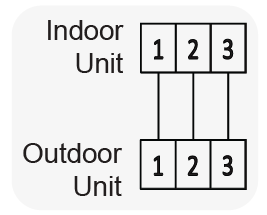
Do not mix up the wires between each ends.
Consult the diagrams affixed to the indoor and outdoor units respectively for specific wiring instructions.
Steps
Follow these steps to connect the power/signal electrical wiring to the outdoor unit:
- Unscrew and remove the handle on the right side plate of the outdoor unit.
- Wire the system using the appropriate gauge wire and the wiring diagram found on the handle cover. For information on the appropriate gauge wire to use, click here.
- Use a proper flexible rain-tight conduit with appropriate size connectors.
- Fasten the power connection wires into place using the supplied wire clamps.
- Check the wiring against the diagram to ensure it is wired correctly. A proper ground connection must be established.
- Rescrew and reinstall the cover handle.