Clean the Filters for Floor/Low-Wall Mounted SystemsUpdated 5 months ago
Introduction
This article explains how to clean the filter for floor/low-wall mounted systems.
The filter prevents dust and other particles from entering the indoor unit. Dust buildup can reduce the efficiency of the air conditioner. For optimum efficiency, clean the air filter every two weeks or more frequently if the unit is in a dusty area. Replace the filter with a new one if it's heavily clogged and cannot be cleaned.
This article applies to the following system:
Caution
- Always turn off the system and disconnect its power supply before cleaning or performing maintenance.
- An authorized dealer or licensed service provider must perform the removal and maintenance of the filter.
- When removing the filter, do not touch metal parts in the unit. The sharp metal edges can cut you.
- Do not expose the filter to direct sunlight when drying. This can shrink the filter.
Steps
1. Pull the front panel's left and right handles. Then, pull the panel outward and open the panel. 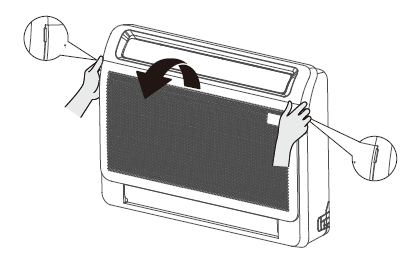
2. Remove the air filter. Slightly press down the claws on the left and right sides of the air filter, and then pull the filter upward. 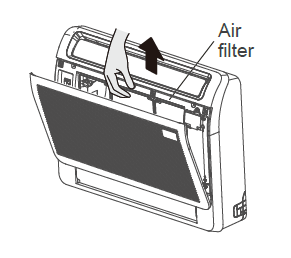
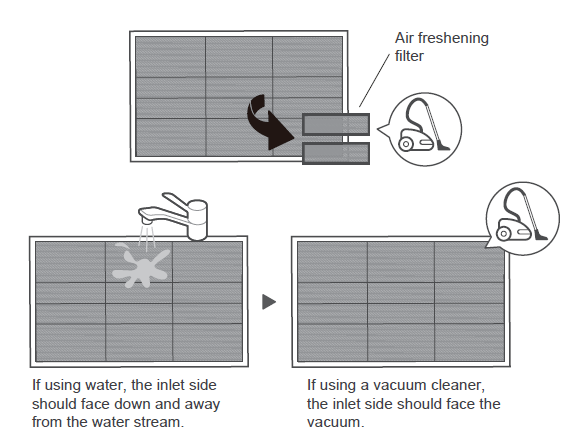
3. Hold the frame's tabs, then remove the four claws. Wash the special function filter with water every 6 months. Replacing the filter every 3 years is recommended.
4. Clean the air filter by vacuuming the surface or washing it in warm water with mild detergent. Rinse the filter with clean water and allow it to air-dry. Reinstall the filter.